
LightInTheBox Online Shopping
Light In The Box LimitedShopping
4.516.21K Reviews
- Version
- 9.17.0
- Installs
- 10.00M
- Age Rating
- Teen
Screenshots

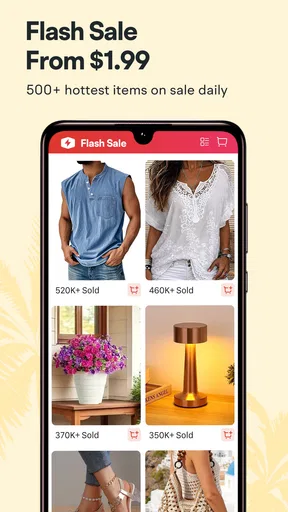
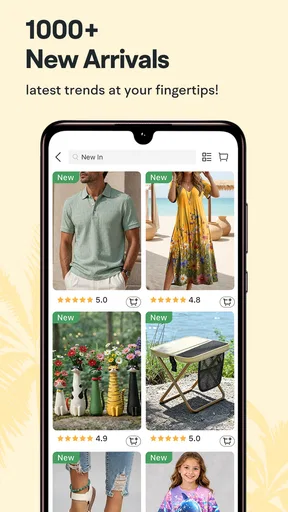

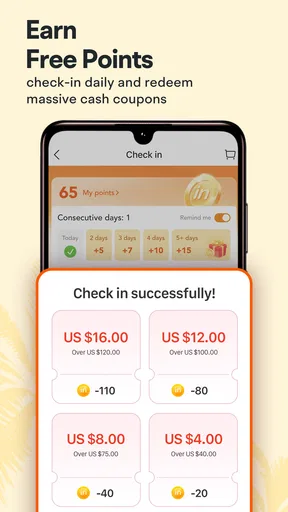

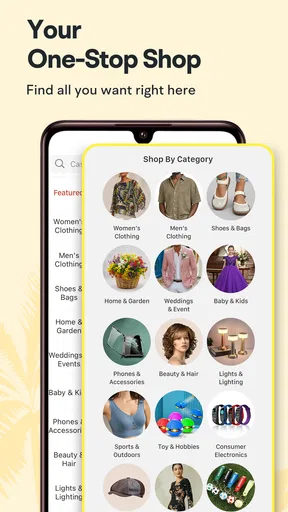
Our Review of LightInTheBox Online Shopping
 Analysis by Appyee
I used LightInTheBox Online Shopping as the kind of marketplace people open when they want to browse far beyond the usual local selection. It is a shopping app from Light In The Box Limited, and its appeal is easy to understand: clothing, accessories, home items, and many other product types can be explored in one place rather than through several separate stores. My experience is that the app works best for patient browsing, comparison, and discovering unusual options, not for a rushed purchase where I need a familiar brand and a guaranteed fit immediately.
The app is free to install and is aimed at a Teen audience, which matters when a phone or tablet is shared at home. A child, teenager, or guest can easily browse products, but browsing is not the same as being ready to make purchasing decisions. I would treat the app as a marketplace that needs ordinary household boundaries around accounts, payment details, delivery information, and final approval. That simple distinction makes the experience much easier to manage.
How LightInTheBox fits into a shared household
On a shared device, I would first decide whose account is being used before anyone starts filling a cart. A marketplace can remember preferences, addresses, and order activity, so switching casually between household members may create confusion. One person might add a jacket while another is comparing kitchen products, and the next user could mistake the cart for a personal shortlist. I found that a clear rule—one account owner at a time—prevents most of this friction.
This is especially useful when several people shop for the same home. One person may look for clothing, another may search for decorative items, and someone else may be checking gifts. The broad catalog encourages this kind of mixed browsing, but it also makes an unorganized cart difficult to interpret. I prefer using the cart only for items that are close to a decision and keeping interesting possibilities in a separate note or screenshot outside the app. That way, a family member can understand what is actually intended for purchase.
A realistic example is a household preparing for a trip. I might use the app to compare lightweight clothing, accessories, and small travel-related items while another person checks home products. Instead of placing everything in one rushed order, I would review each item individually, confirm the intended recipient, and check the final order details before paying. This extra minute is worthwhile because variety is one of the app’s strengths, but variety also increases the chance of selecting something that looked right only at first glance.
The most useful shared-device habit is separating browsing from buying. Letting someone explore products does not mean giving them permission to finalize an order. If a teenager is using the app for ideas, I would keep the payment step with the account owner and discuss the total before anything is submitted. The app itself should not be treated as a substitute for household rules about spending.
Starting with a manageable shopping routine
LightInTheBox can feel expansive from the first session because it is not built around one narrow product category. I recommend beginning with a specific purpose rather than opening the app with no plan. Searching for a type of item, a particular style, or a room-related need gives the browsing session a useful direction. Without that focus, it is easy to spend time moving from one appealing product page to another without deciding what problem the purchase is meant to solve.
When I compare products, I look beyond the main image. I check the available variations, read the full item information, and compare the product with similar listings before adding it to the cart. This is more important for clothing, where appearance alone cannot tell me whether a cut or size will work. For household goods, I also think about where the item will be used and whether its dimensions or design suit that space. A visually attractive product is not automatically a practical one.
One helpful workflow is to make a short list of requirements before searching. For a clothing purchase, that might include the intended use, preferred material, color, and acceptable fit. For a home item, I might note the available space and whether the object needs to be decorative or functional. This turns the app from an endless catalog into a comparison tool. It also makes group shopping easier because other household members can comment on the same criteria instead of reacting only to pictures.
The current version is 9.17.0, and the app runs on Android devices using version 6.0 or later. That makes it accessible on many older phones, although the quality of the experience will still depend on the device, screen, connection, and how comfortable the user is with a large marketplace. On a smaller or older phone, I would expect product comparison to require more patience because reading details and switching between listings can feel less convenient than on a larger screen.
Keeping accounts and decisions separate
For a couple or family, account boundaries are more important than they may seem. I would avoid leaving an account open on a shared phone if other people can access the device freely. Even when everyone is acting in good faith, saved information and an active cart can lead to accidental changes. A person who only intended to browse may remove an item, add a different variation, or continue toward checkout without realizing whose session is active.
I also recommend agreeing on who checks the order before it is submitted. That person should review the selected variation, quantity, recipient, delivery details, and total shown at checkout. This is not unique to LightInTheBox, but the app’s broad selection makes the review step particularly valuable. Similar-looking listings can have different options, and a product image may represent more than one selectable version.
For shared use, I would keep the app on one household member’s personal device when possible and let others browse together rather than passing around an account. If that is not practical, the household should at least use a simple verbal handoff: say who is signed in, what is being researched, and whether the cart contains real purchases or only possibilities. That small routine avoids the awkward situation where one person assumes an order is ready while another person was still comparing ideas.
LightInTheBox is free, but free access should not be confused with a free shopping experience. The cost begins when products are selected, and the final decision deserves the same care as any other online purchase. I would not let a younger user interpret the absence of an upfront app charge as permission to order. The account owner should remain responsible for the checkout decision.
Coordinating a purchase instead of merely sharing a cart
When several people are involved, I find it better to coordinate around the purpose of the order than around the app itself. For example, one person can collect possible clothing choices, another can check whether the colors suit the recipient, and the account owner can make the final selection. This gives each person a clear role without requiring everyone to handle payment or personal account information.
The app is particularly suitable for this kind of visual comparison. A household can sit together and discuss style, usefulness, and suitability while looking at several options. I would still avoid making a decision based only on the most eye-catching image. The person who will actually wear or use the item should have the strongest voice, especially when fit, comfort, or daily practicality matters.
A less obvious advantage of this approach is that it reduces impulse buying. When another person asks, “Where will this be used?” or “Which requirement does this meet?” the group naturally filters out products that are attractive but unnecessary. That is valuable in a marketplace with abundant variety. The same abundance that helps me find something distinctive can also make it easy to add items simply because they are interesting.
For gifts, I would keep the recipient’s needs separate from the purchaser’s taste. LightInTheBox can be useful when I want to explore styles outside the standard selection available nearby, but I would spend more time checking whether the gift is genuinely appropriate. A shared household can divide the work: one person searches, another checks the details, and the buyer confirms the final choice. This is more reliable than asking several people to independently place items in one cart.
When comparing LightInTheBox with a familiar local retailer, the trade-off is clear. A local store or established domestic marketplace may be better when I need a product quickly, want an easy return conversation, or already know the exact brand and size. LightInTheBox is more appealing when I value range, unusual designs, and the chance to discover products that are not part of my normal shopping routine. I see it as a discovery-focused option rather than a universal replacement for every purchase.
Teen access, trust, and sensible supervision
The Teen content rating makes the app relevant to households where younger users share devices with adults. I would be comfortable letting a teenager browse with guidance, particularly for ideas, gifts, clothing inspiration, or room decoration. I would not hand over unrestricted purchasing responsibility simply because the app is easy to open. The important boundary is between viewing products and committing household money or personal delivery information.
Trust also includes teaching users how to judge listings. I would encourage a teenager to explain why an item is suitable, identify the intended use, and compare it with at least one alternative before asking for approval. This turns shopping into a practical lesson in evaluating choices rather than a quick reaction to attractive images. It also gives the adult a chance to notice misunderstandings before they become an order.
I would be careful about sharing personal information on a communal device. The person making the purchase should handle account details, delivery information, and payment decisions. A younger user can participate in selection without needing access to every part of the shopping process. That division is useful even in a trusting family because privacy and responsibility are not the same thing.
For older relatives who are less comfortable with online shopping, the app may be enjoyable if someone helps with navigation and comparison. The catalog can offer more variety than they expect, but the number of choices may also be tiring. I would sit with them, narrow the search, enlarge the relevant details where possible, and let them make the final preference. The goal should be assistance, not taking over the purchase.
There is also a trust issue around expectations. I would explain that product photos are useful for judging general appearance, but they are not a complete substitute for reading the item information. This is true for any online marketplace, yet it matters more when the app encourages exploration across many product types. A household that agrees to slow down at the details stage will usually have a better experience than one that treats every image as a complete promise.
Where the app is strongest—and where I would choose something else
LightInTheBox’s strongest quality is the breadth of its shopping experience. I can use it when I want to browse several kinds of products, compare styles, or look for something less ordinary. The app is also useful for households that enjoy making a shared shortlist, because different people can contribute ideas across clothing, accessories, and home-related shopping.
Its weaker side is the effort required to make a confident decision. A large catalog does not remove the need for careful checking. If I need a basic item today, already know the exact model, or want the simplest possible replacement process, I would probably choose a nearby retailer or a marketplace with a more familiar local fulfillment experience. LightInTheBox makes more sense when I have time to investigate rather than when convenience is the only priority.
I would also skip it for a purchase where fit or exact specifications are critical unless I am willing to examine the available information carefully. Clothing is a good example: style can attract me to a listing, but the final choice should be based on the relevant sizing and product details. For a household purchase, I would similarly verify that the item suits the intended space and purpose instead of assuming that the main photograph tells the whole story.
The app has a 4.5 average from around 302 thousand ratings, with more than 16 thousand written reviews and over 10 million installs. Those figures suggest that it has reached a substantial audience, but they do not remove the need for personal judgment. I use popularity as a reason to investigate the app, not as proof that every listing will suit every buyer.
My household verdict
I recommend LightInTheBox to people who enjoy exploring a wide shopping catalog and are prepared to compare before buying. It is a particularly good fit for a household that wants to collaborate on clothing ideas, gifts, accessories, or home items while keeping one adult responsible for the final order. The free app is easy to try, and its broad selection gives it a different character from a narrowly focused retailer.
I would not recommend treating it as an unattended shopping tool on a shared device. The better approach is simple: identify the active account, keep browsing separate from checkout, involve the intended user in the decision, and review the final details together. Those habits address the main household risks without making the experience unnecessarily complicated.
My final impression is positive but measured. LightInTheBox Online Shopping is most rewarding when I approach it as a place for discovery and comparison, not as a shortcut around careful shopping. If you value unusual choices and have time to check what you are selecting, it can become a useful addition to your shopping routine. If you need speed, absolute familiarity, or the least complicated path to a known product, a conventional local alternative may serve you better.
Verdict
Strengths of LightInTheBox Online Shopping
- Wide range of products across fashion, home, electronics, and accessories.
- Frequent discounts, flash sales, and coupon offers can reduce prices.
- International shipping is available to many countries.
- Product pages often include customer photos and detailed size information.
- The app supports multiple currencies and languages for global shoppers.
Limitations of LightInTheBox Online Shopping
- Delivery times can vary considerably, especially for international orders.
- Sizing may differ from local standards, so checking measurements is essential.
- Return shipping costs may be high for some items or destinations.
- Product quality can be inconsistent between different sellers and categories.
- Customs fees or import taxes may apply depending on your country.
Similar Picks in This Category
View All
SHEIN-Shopping Online
Roadget Business PTE. LTD.4.8

Amazon Shopping
Amazon Mobile LLC4.4


Mercado Libre: Compras online
Mercado Libre4.8

Wish: Shop and Save
Wish US Holdings LLC4.7

Alibaba.com - B2B marketplace
Alibaba Mobile4.4
Frequently Asked Questions
What is LightInTheBox Online Shopping?
LightInTheBox is an international shopping app that offers clothing, accessories, home goods, electronics, beauty products, and other items from global sellers. After installing the app, users can browse products by category, view photos and descriptions, compare prices, read customer reviews, add items to a cart, and place orders for delivery to supported countries.
Is LightInTheBox safe and legitimate to use?
LightInTheBox is a genuine online marketplace, but shoppers should use the same care required on any international shopping platform. Before ordering, check the seller information, product ratings, customer photos, sizing details, return conditions, estimated delivery time, and the final price. Using a secure payment method and reviewing the order confirmation can also help protect your purchase.
How much does shipping cost, and how long does delivery take?
Shipping costs and delivery times vary depending on the product, warehouse location, destination country, shipping method, and order value. The app normally displays available shipping options and an estimated arrival period before payment. Standard delivery may take longer than local shopping services, while expedited shipping can cost more. Customs charges or import taxes may also apply.
Can I return products purchased through LightInTheBox?
Returns may be available, but the exact rules depend on the product category, seller, destination, and reason for the return. Some items can have special restrictions, particularly personalized products, clearance goods, underwear, or hygiene-related products. Before buying, read the return policy carefully. If an issue occurs, contact customer support through the app and retain photos, packaging, and order details.
Are the products on LightInTheBox good quality and true to size?
Product quality can differ because LightInTheBox offers a wide range of items from different suppliers. Clothing sizes may also vary from standard local measurements, so users should consult the individual size chart instead of relying only on their usual size. Customer reviews, uploaded photos, material descriptions, and product ratings are useful for judging appearance, fit, and quality before ordering.
